fosforo on the App Store: a Terminal With a Shell of Its Own
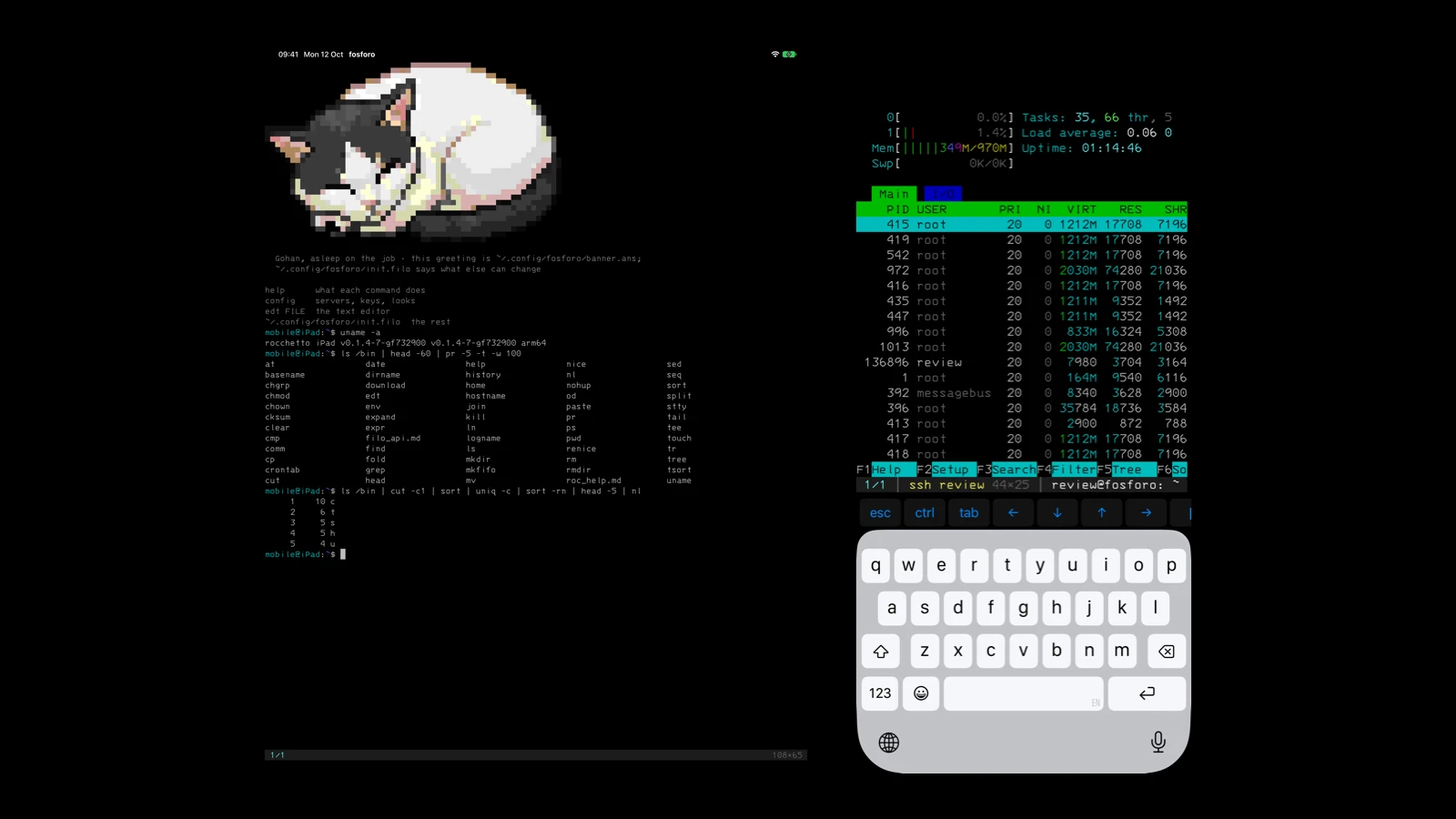
fosforo is on the App Store. Free, for iPad and iPhone; the Mac build is a Homebrew cask. It is a terminal emulator in C and Swift, drawn with Metal, and on iOS it carries its own shell, its own SSH client and its own Mosh client. Open the app on an iPad with no network and you have a prompt, a filesystem, pipes and sixty-odd commands. That is the part I am happiest about.
The repository was created on September 29. The first build went to App Store Connect on October 8, and 1.0.1 was approved on October 20.
A shell that runs on iOS
iOS has no fork and no exec. There is no /bin/sh to spawn and no way to spawn anything. So fosforo carries its shell inside the process: rocchetto, a POSIX shell written in C with no C library under its core. The same code runs as a desktop binary, in a browser tab as wasm, on a microcontroller board with a 20x8 screen, and inside fosforo as a static library. Pipes, redirects, $(...), functions, if/for/while, history, Tab completion, a line editor.
mobile@iPad:~$ ls /bin | cut -c1 | sort | uniq -c | sort -rn | head -3
     10 c
      6 t
      5 s
That pipeline runs on the iPad, offline, with no server behind it. Every stage is a program in /bin.
The commands are Filo
ls, grep, sed, sort, find, wc, tr, xargs and the rest of the 64 commands in /bin are not C. They are Filo programs, compiled to bytecode for the Filo VM and shipped inside the app. What sits in /bin is the compiled program; the source of every one of them is in commands/bin in the rocchetto repository, grep.filo included.
Filo is my scripting language. It was written to give users scripting power without handing them the machine, and that is exactly the constraint an app store imposes. It turned out to be a good fit for a shell’s userland too: a command is a short program, the whole set compiles in seconds, and a bug in sort is a one-file fix. expr, sed and date were the ones that took real work; the rest came fast once the pattern was set.
The terminal’s own configuration is Filo as well. ~/.config/fosforo/init.filo sets the font, the grid, the colors, the bell. Themes are files. And there are event hooks, so the terminal reacts without me adding a checkbox for each case:
(set on-blur (fn (arg) (theme "phosphor")))
(set on-focus (fn (arg) (theme "default")))
Lose focus, the window goes phosphor green. Come back, it goes back. Four lines, no setting screen.
On the Mac none of this is needed and none of it is there. The Mac app is an emulator and nothing more: your login shell on a pty, the system’s ssh, the system’s git. A terminal that brings its own shell to a machine that already has one is solving a problem the machine does not have.
SSH and Mosh inside the app
ssh on the iPad is the app’s own client, written in Swift over CryptoKit. Curve25519 key exchange, and the hybrid mlkem768x25519-sha256 where the server offers it; AES-GCM; strict kex; ed25519, ECDSA and RSA host keys; known_hosts with trust on first use; ~/.ssh/config with the usual semantics, every matching Host applies and the first value wins; ProxyJump; -L, -R and -D; agent forwarding where the signing happens on the device and the key never leaves it. A second ssh to a host already connected shares the connection and opens at once.
Mosh is the same story one layer down: SSP over UDP with OCB3, the wire format done by hand, tested against a real server with a third of the packets dropped on purpose. Local echo prediction shows above 30 ms of RTT and underlines above 80 ms, and the one rule that matters: after Return nothing is predicted until the server confirms a guess, which is what keeps a password off the screen. I tested that with read -s against a real server before trusting it.
Apple’s review network is IPv6-only, with NAT64. The SSH client resolves AF_INET and AF_INET6 in parallel and takes whichever answers first; Mosh then uses the address the SSH session arrived on. I found that in the guidelines before the reviewer found it in the app, which is the cheap order.
Keys in the Secure Enclave
Keys live in ~/.ssh inside the app, mode 0600, under the strictest file protection iOS has, and they are left out of device backups so they do not travel to the next device. That is the default and the key is a plain file: ssh-keygen -t ed25519 on the iPad works as it does on a computer, and ssh-copy-id is there too.
key protect NAME goes further. The key is sealed by this device’s Secure Enclave, and each use asks for Face ID, Touch ID or the passcode. Copy the file somewhere else and it is noise. The app never sees biometric data; the system does the asking.
Nothing is moved, deleted or encrypted without a command and a confirmation. I do not like software that does things on its own, and I did not write any.
Nothing collected
No analytics, no crash reporting, no accounts, no ads, no subscription. The privacy label on the store says “Data Not Collected” and it means it: the app connects only to the machines you name, or that a program you run asks for.
The terminal itself
The same core draws both platforms. vt/ is a VT parser in C11 written from scratch, with no I/O and no global state, fuzzed, around 600 MB/s of plain ASCII on this Mac. The first plan was to port the parser from an older terminal of mine; it had too many gaps, so the lessons were kept and the code was not.
Box drawing, blocks, shades, braille and the Powerline separators are drawn from geometry, not taken from the font, so ANSI art has no seams between cells. I care about that more than is reasonable. The default font is IBM 3270. Full-screen programs render the way they should.
On the Mac: several sessions per window, ⌘F through the scrollback, a copy mode with hjkl, ⌘↑/⌘↓ between prompts when the shell emits OSC 133, a notification when a long command finishes in a session that is not in front. The Mac app is not on the Mac App Store: the sandbox does not fit a terminal that runs your login shell. It is signed, notarized and distributed as a cask.
The review
Approved on the first review. The notes to the reviewer explained what the shell is: it runs scripts the user writes and downloads no functionality, which is what guideline 2.5.2 asks. A login on a demo server let the SSH and Mosh commands be exercised. One thing I learned on the way: iOS icons cannot have an alpha channel, and the script that draws the icon now drops it for iOS and keeps it for macOS.
Where to get it
- iPad and iPhone, free: App Store
- Mac, with Homebrew:
brew install --cask crgimenes/tap/fosforo - Mac, by hand: fosforo-macos.zip, signed and notarized
- Source, MIT: github.com/crgimenes/fosforo